Creating a TESDA Online Program (TOP) account in the Philippines is simple and free. You only need an active email address, a username, and a password to create and activate your account. Once it’s done, you can log in and start exploring TESDA online courses already.
The TESDA Online Program is designed for Filipinos who want to learn new technical and vocational skills without going to a training center right away. It is helpful for students, workers, OFWs, returning OFWs, and out-of-school youth who want flexible learning options using a phone or computer with internet access. It allows users to study at their own pace, anytime and anywhere. While some courses are for learning only, others can support future skills training or certification when paired with face-to-face assessments.
Creating a TESDA Online Program Account
Before you can register and create an account, you will need the following:
- Active email address (you must be able to open it to confirm your account)
- Mobile phone, tablet, or computer
- Stable internet connection (mobile data or Wi-Fi)
That’s all you need—no payment, no documents, and no ID upload required just to create a TESDA Online Program account.
Once you are ready, you can already visit the official registration page: https://e-tesda.gov.ph/login/signup.php and follow the steps below:
Step 1: Go to the Login Page
On the TESDA Online Program website, read the Privacy Notice and click the I agree to the TESDA ONLINE PROGRAM – PRIVACY NOTICE button.
Step 2: Fill Out the New Account Form
You will see the captured registration form below. Fill it out completely. Take note that the fields marked with an asterisk (*) are required.
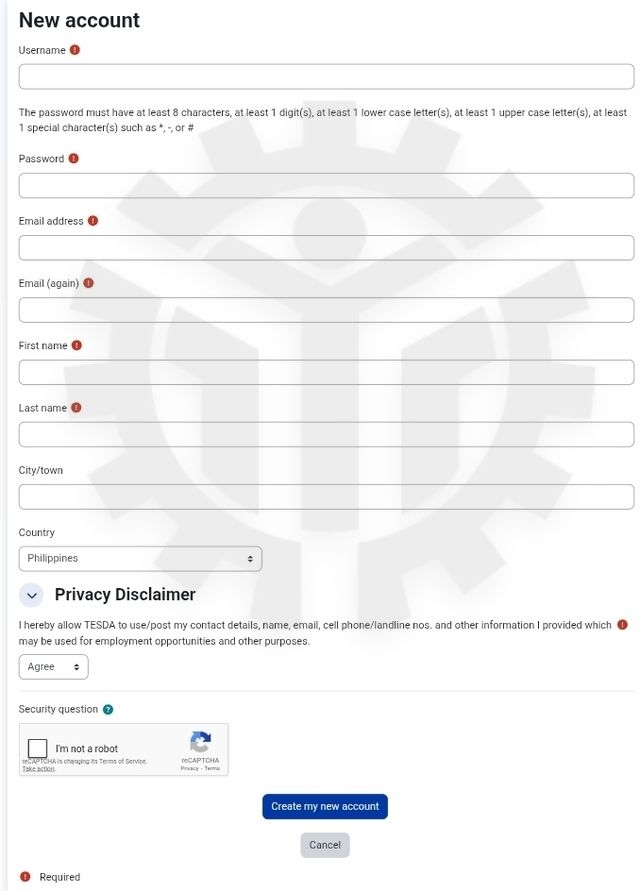
You need to provide:
- Username
- Password (at least 8 characters, with 1 number, 1 lowercase letter, 1 uppercase letter, and 1 special character like *, #, or _)
- Email address (enter it twice)
- First name and last name
- City/Town
- Country (Philippines is already selected)
Step 3: Complete the “I’m not a robot” security check.
Step 4: Click Create my new account to continue.
Step 5: Check Your Email and Activate Your Account
After submitting the form, TESDA will send a confirmation email. This may arrive within minutes, but sometimes up to 24 hours.
- Open the email
- Click the activation link inside
If you don’t see it, check your Spam or Promotions folder.
Once you click the link, your account will be activated and ready to use.
What to Do After Creating Your Account
After activation, you must:
- Log in using your username and password
- Update your profile if prompted
- Choose the course you want to join
- If asked for an enrollment key, enter the one given by your trainer
- Start learning
From then on, you can log in anytime to access your enrolled courses.
Common Problems and Where to Get Help
If you experience signup or login issues, missing emails, or technical errors, you can contact TESDA through the following:
- Email: tesdaonlineprogram@tesda.gov.ph
- Tel: (+632) 893-8297
You may also visit or contact the nearest TESDA office in your area.
Register now and take your first step toward learning with TESDA—online, flexible, and accessible regardless of your age, location, economic status, or gender.