The TESDA Biometric-Enabled Scholarship Registration System (BSRS) is an online platform created by the Technical Education and Skills Development Authority (TESDA) that allows you to check your scholarship application status. To do so, you only need to go to the official BSRS website, log in, and you can see all your applications and their status.
The TESDA BSRS was also developed such that it works closely with TESDA training institutions and provincial offices to record enrollment, track attendance, and show the progress of students taking technical vocational education and training (TVET) programs. Through this system, learners—from out-of-school youth to OFWs returning home—can easily check their education and scholarship details without visiting a school or office.
How to Check Scholarship Status in TESDA BSRS
TESDA scholarship programs aim to give financial assistance and training opportunities to deserving learners. These programs were designed to specifically help people learn practical skills that can lead to employment, entrepreneurship, or better job opportunities locally and abroad. For many of these learners, the TESDA BSRS is the easiest way to track their scholarship status, training progress, and enrollment information. Plus, it only takes a few minutes and even fewer steps.
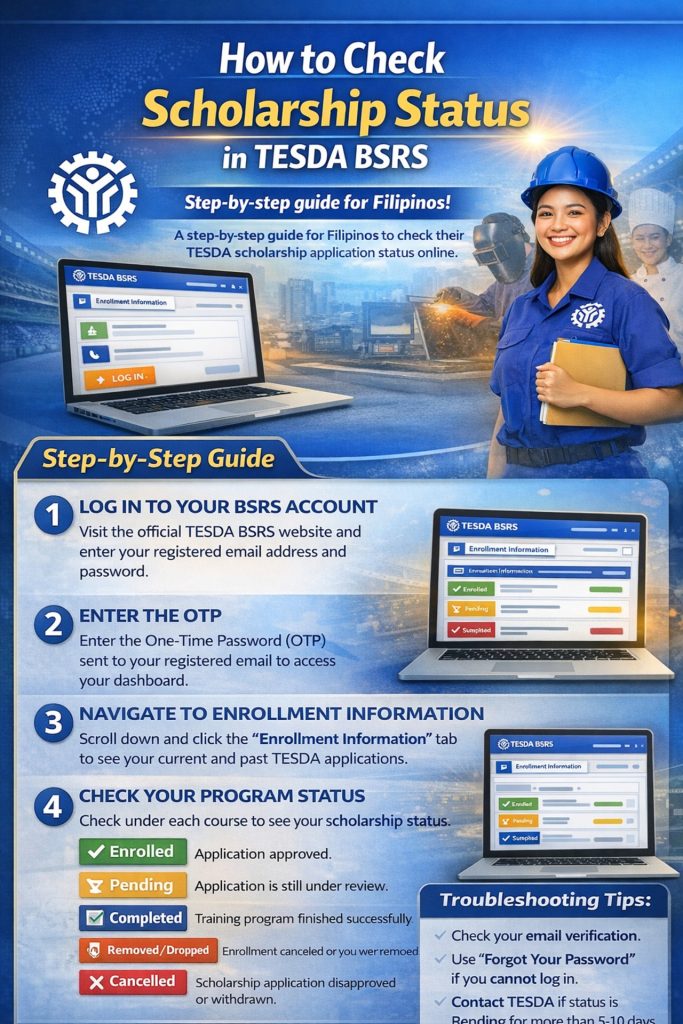
To check on your past and present scholarship status via the BSRS, you may follow these steps:
Step 1. Log in to your BSRS account
Go to the official TESDA BSRS website and sign in using your registered email address and password. This is the same email you used when you applied for your TESDA scholarship or registered for training.
Step 2. Enter the One-Time Password (OTP)
- After logging in, the system will send an OTP (One-Time Password) to your registered email.
- Enter the OTP on the website to access your dashboard.
Step 3. Open the “Enrollment Information” section
Once you are inside your account dashboard:
- Scroll down the page
- Click the “Enrollment Information” tab
This section shows all your past and present TESDA training applications.
Step 4. Check your program status
Under each course or training program, you will see the scholarship status. Common status updates include:
- Enrolled / Approved: Your scholarship application was accepted and you are officially part of the training program.
- Pending: Your application is still under review by the TESDA training institution or provincial office.
- Completed: You have finished the training program successfully.
- Removed / Dropped: Your enrollment was cancelled or you were removed from the program.
- Cancelled / Disapproved: Your scholarship application was not approved or was withdrawn.
This section also shows other training details, including the course and the school or training institution involved.
What to Do If Your Status Is Still Pending
Sometimes your BSRS scholarship status may stay “Pending” for several days. This usually means your application is still being checked by the training institution or TESDA office.
If your status does not change after 5–10 working days, you can:
- Contact the TESDA training institution where you applied
- Visit or call the nearest TESDA Provincial Office
- Check your email or SMS messages for updates from TESDA
TESDA often sends automatic notifications whenever your scholarship status changes.
Troubleshooting Tips
If you cannot access your account or check your status, try these quick fixes.
- Check your email verification: Make sure your account is verified. Look for confirmation emails in your inbox or spam folder.
- Use the “Forgot Your Password” option: If you cannot log in, reset your password through the BSRS login page.
- Wait for official notifications: TESDA may send updates about your scholarship status through email or SMS.
For many TESDA learners—including OFWs, returning OFWs, out-of-school youth, career shifters, and job seekers—TESDA scholarships open doors to new skills and career upgrade opportunities. Staying updated with your scholarship status via the TESDA BSRS helps you move forward with confidence.