Looking for a scholarship no longer requires visiting different training centers or scrolling through random posts, thanks to the TESDA Skills Passport app. With this, you can now check available scholarship programs in real time, see how many slots are left, and apply directly using your phone.
You can just download the app and create an account, and you can already check all available TESDA scholarships. You can even apply and track your application status in real-time as the system is connected to TESDA’s official database which houses the most updated information straight from the Technical Education and Skills Development Authority (TESDA).
Checking for Scholarships via the TESDA Skills Passport App
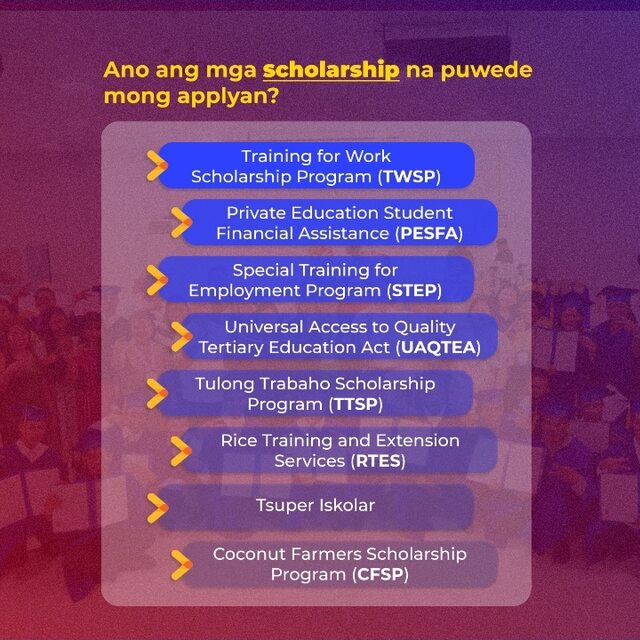
For many Filipinos—including OFWs, returning OFWs looking to upskill before redeployment, returning workers looking to start over, youth looking for practical training, out-of-school youth (OSY), parents seeking technical education, and career shifters—finding a legitimate scholarship can be troublesome, especially with the sheer number of unverified and obsolete information available online. The TESDA Skills Passport app solves this problem of checking scholarship opportunities by showing only the verified and most updated scholarship opportunities in the country.
Here’s how:
Step 1: Download and Log In
- First, install the TESDA Skills Passport app from your device’s app store. After installing:
- Create an account (if you’re new), or
- Log in using your existing credentials.
- Make sure your profile is complete. Your digital profile helps training centers review your qualifications faster.
Step 2: Tap the “Scholarship” Icon
- Once inside the dashboard, look for the Scholarship icon.
- Tap it.
- You will immediately see a list of available scholarship programs under TESDA. These are official listings connected to the government’s system, not third-party ads.
The app is integrated with the Biometric-enabled Scholarship Registration System (BSRS). That means the slot availability you see is updated in real time. No guessing. No outdated lists.
Note: If you do not have a BSRS account, you will be required to complete your profile and automatically create a BSRS account.
Step 3: Filter by Location or Course
- If you feel overwhelmed by too many results, don’t worry. You can use the search and filter tools and filter by:
- Location (example: Regional Training Center near you)
- Specific qualification or course
- Training center
This is helpful for:
- OFWs returning to a specific province
- Students who want short-term technical courses
- Parents helping their children find nearby options
Filtering saves time and helps you focus only on what fits your needs.
Step 4: Review Course Details Carefully
- When you tap a course, you’ll see:
- Training center name and address
- Total available slots
- Number of slots already taken
- Qualification details
- Take a moment to review everything. Check if the training center is accessible to you.
- Look at how many slots are left so you can decide quickly.
Remember: TESDA scholarships can fill up fast.
Step 5: Tap “Apply Now”
- If the course matches your goals, tap Apply Now.
- Follow the instructions inside the app. Since your digital profile is already stored in the system, applying is faster than manual walk-in registration.
Step 6: Track Your Application
- After applying, go to the My Applications fold to:
- See if your application is pending
- Check if it was approved
- Monitor updates
- You don’t need to keep calling training centers for follow-ups.
Other Features
The TESDA Skills Passport app is more than just a scholarship finder. You can also see:
- Centers Near Me: A built-in map helps you locate nearby accredited TESDA training institutions across the Philippines.
- Digital Profile: You can upload and store:
- National Certificates (NC)
- Training certifications
Note: This works like a digital portfolio you can show to employers.
- AI Assistant – “Professor K”: The app also includes an AI assistant called Professor K. You can ask questions about training programs and scholarships directly inside the app.
Using the TESDA Skills Passport App
Education and technical skills training can open new job opportunities locally and abroad. This is why TESDA offers accessible vocational education scholarship options that are both visible and trackable in one place. No long lines. No outdated announcements. No unclear slot counts. Just opportunities for free technical and vocational education waiting for you to take the first step.